Infrastructure becomes a reviewed, simulated, versioned model.
IntraLogic ingests information, asks clarifying questions, builds the environment model, simulates impact, turns alerts into visual snapshots, and publishes reviewed versions.
The visual shows how documentation, APIs, signals, and configuration inputs become structured infrastructure intelligence.
Ingest → clarify → model → simulate → alert snapshot → publish version.
Monitoring tells you something is down. IntraLogic tells you what it means.
By understanding dependencies, teams skip the blind troubleshooting — and stop a single failure from spreading into a wider outage.
State snapshot
Every major alert opens a diagram of the exact infrastructure state at the moment of the event.
Impact report
See which sites, roles, storage paths, and workloads are affected or at risk — at a glance.
Action context
Start from context, not a scavenger hunt across monitoring tools, diagrams, and stale docs.
| Capability | Monitoring tools | Documentation tools | Diagram tools | IntraLogic |
|---|---|---|---|---|
| Dependency model | — | Static | Visual only | ✓ Live model |
| Diagram creation | — | — | Manual | ✓ Automatic |
| Failure simulation | — | — | — | ✓ |
| Cross-domain analysis | Per-metric | — | — | ✓ |
| AI infrastructure assistant | — | Partial | — | ✓ |
| Health scoring | Uptime only | — | — | ✓ |
| Governance & versioning | — | Partial | — | ✓ |
| Reporting | Metrics | Static docs | Export image | ✓ Executive & technical |
From scattered inputs to one connected model.
Documentation, APIs, and signals flow into one connected model. A deterministic engine simulates impact — the AI assistant helps you build and explore it.
Read-only connectors and uploaded documentation feed a deterministic engine, which normalizes and correlates them into one connected model spanning Sites, Physical, Core Roles, Storage, Virtual, VDI and Backup. That model is what simulation and reporting run against.
- VMware vCenter
- Microsoft Hyper-V
- TrueNAS
- Cisco IOS-XE
- Cisco NX-OS
- Generic SNMP
- UniFi
- Dell iDRAC
- SonicWall
Plus uploaded documentation, exports and operational notes.
- Normalize every source to one vocabulary
- Correlate by MAC and SCSI identity
- Low-confidence matches go to review
Nothing enters the model unreviewed.
- Sites
- Physical
- Core Roles
- Storage
- Virtual
- VDI
- Backup
Every object carries the evidence behind its links.
- Simulate impact before a change
- Explain what depends on what
- Document the environment as it is
- Report to engineers and to the board
Discovery uses whatever protocol each platform actually speaks — SSH, WinRM and PowerShell, SNMP v2c/v3, Redfish, JSON-RPC, and vendor REST and SOAP APIs. Which one applies is a property of the connector, not something you configure. All of them are read-only and outbound: no inbound ports, no firewall changes.
| Platform | Identifier | Status |
|---|---|---|
| Virtualization | 2 of 5 available | |
| VMware vCenter | vmware_vcenter | Available |
| Microsoft Hyper-V | hyperv | Available |
| Proxmox VE | proxmox | Planned |
| Nutanix | nutanix | Planned |
| XenServer / XCP-ng | xcpng | Planned |
| Storage | 1 of 6 available | |
| TrueNAS | truenas | Available |
| Ceph | ceph | Planned |
| Synology | synology | Planned |
| Dell PowerStore | dell_powerstore | Planned |
| NetApp | netapp | Planned |
| Pure Storage | pure | Planned |
| Switching | 4 of 8 available | |
| Generic SNMP | snmp | Available |
| Cisco Catalyst / IOS-XE | cisco_ios | Available |
| Cisco Nexus / NX-OS | cisco_nxos | Available |
| Aruba / HPE | aruba | Planned |
| Juniper | juniper | Planned |
| Dell Networking | dell_networking | Planned |
| UniFi Switch | unifi | Available |
| Meraki | meraki_switch | Planned |
| Firewalls / Edge | 2 of 7 available | |
| Fortinet | fortinet | Planned |
| Sophos | sophos | Planned |
| Palo Alto | paloalto | Planned |
| Cisco ASA / Firepower | cisco_asa | Planned |
| Cisco Meraki | meraki | Planned |
| UniFi Gateway | unifi_gateway | Available |
| SonicWall | sonicwall | Available |
| Server Hardware | 1 of 6 available | |
| Dell iDRAC | dell_idrac | Available |
| HPE iLO | hpe_ilo | Planned |
| Lenovo XClarity | lenovo_xcc | Planned |
| Cisco CIMC | cisco_cimc | Planned |
| Supermicro BMC | supermicro_bmc | Planned |
| Generic Redfish | generic_redfish | Planned |
| Backup | 0 of 3 available | |
| Veeam | veeam | Planned |
| Acronis | acronis | Planned |
| Synology Backup | synology_backup | Planned |
| Custom / Other | 0 of 1 available | |
| Custom REST | custom_rest | Planned |
Read-only throughout. 10 of 36 platforms are available today; the rest are catalogued and planned. This mirrors the integration catalog inside the product.
One small Windows service does all the reaching.
Every platform above speaks a different protocol, and none of them should be exposed to the internet in order to be read. A single lightweight agent sits inside the network, holds the credentials, and does the talking — outbound only.
Read-only, always
It collects inventory and configuration and nothing else. No remote shell, no remote desktop, no file transfer, no script delivery — it runs only the discovery code it shipped with.
Outbound only
It polls IntraLogic over outbound HTTPS, does the work, and posts the results back. No listening port, no firewall rule to add, no NAT entry, no VPN.
Scoped to one client
Enrollment is client-scoped, and the credentials it uses are held for that client alone and encrypted at rest.
What setting one up actually involves
The tenant the model and the credentials will belong to.
One MSI on a Windows host inside the network, enrolled with a token.
Read-only accounts for the platforms you want reached.
On demand or on a schedule. Everything found goes to review.
From beta testing: one environment went from creating the client to a discovered model in about fifteen minutes — install, credentials, discover. How long yours takes depends on how many platforms and credentials are involved and how much of the environment is reachable from one place, so treat that as one observed run rather than a number to plan against. Discovery profiles, added in v5.0, mean credentials are entered once and reused rather than re-entered for every agent. What the agent can and cannot do →
Ingest → Clarify → Model → Simulate → Review → Publish → Report.
AI helps you build the model and ask questions of it — but the deterministic engine runs the actual simulation, so impact analysis is repeatable and explainable, not a guess.
Docs, APIs, signals, and config come in.
Gaps and conflicts get questioned.
The connected model is built.
The engine traces failure impact.
Changes are checked before they count.
A reviewed version becomes the baseline.
Findings export as shareable reports.
What that model looks like in the product.
The animation shows the concept — these are real screens from IntraLogic.
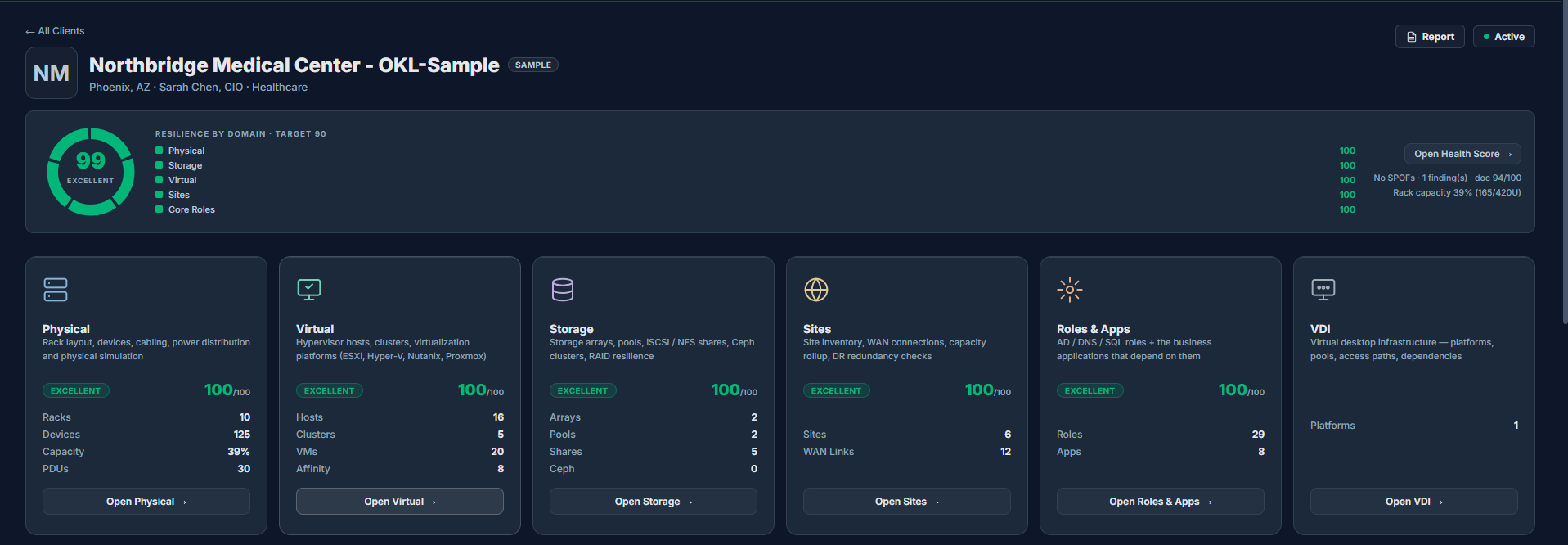
The connected model, scored
Once ingested and modeled, the environment lands on one hub: a single resilience score on top, and a card per domain — Physical, Virtual, Storage, Sites, Roles & Apps, VDI — each scored and counted. This is the output of Ingest → Clarify → Model.
The whole estate is legible at a glance — no one has to assemble the picture from scattered tools.
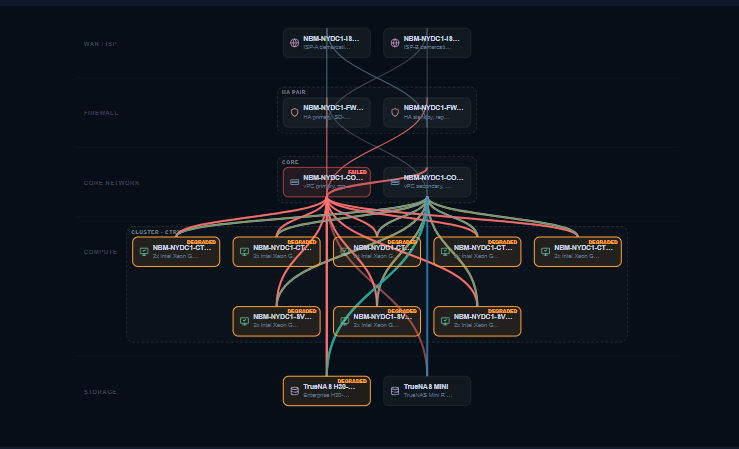
Simulation, run by the engine
Fail a core switch and the deterministic engine cascades the impact — degraded hosts, a single-path storage array, at-risk services — right on the topology. This is the Simulate step, and it’s logic, not AI guesswork.
Repeatable, explainable impact analysis you can stand behind in a change review — because it’s rules, not a best guess.
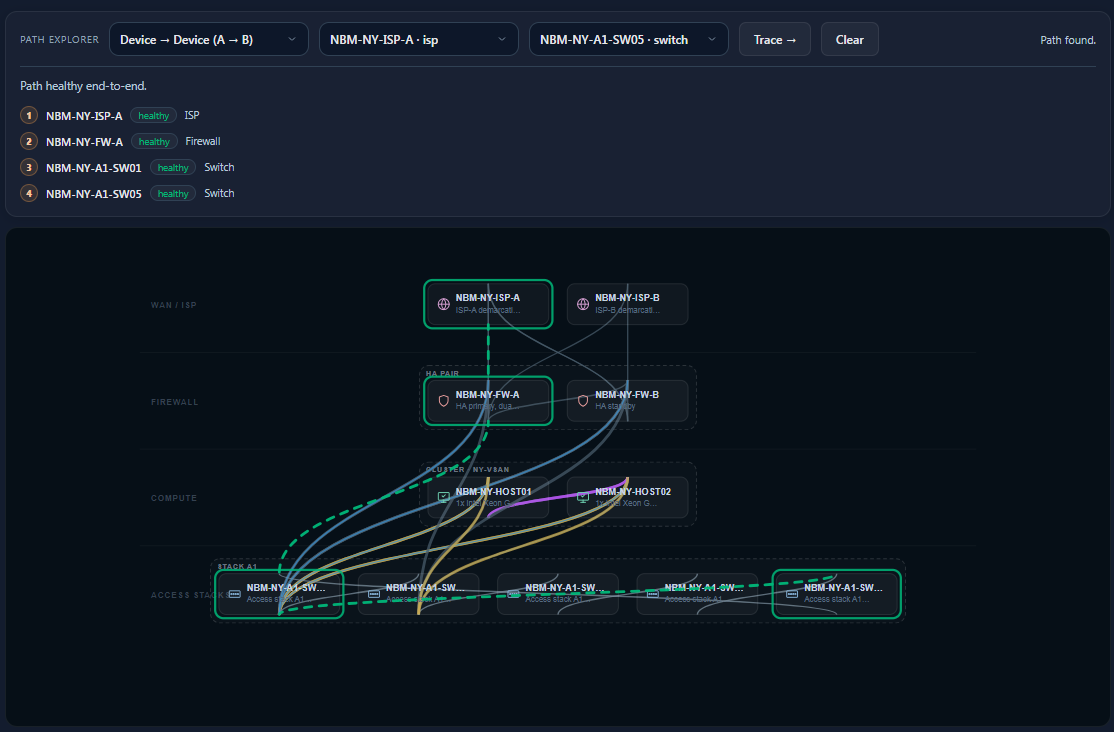
Trace any dependency, hop by hop
Pick two points and IntraLogic resolves the real path against the model — ISP, firewall, switching, compute — with the health of every hop and the route highlighted on the diagram. Part of how you Review the model before publishing.
Catch a missing or single-threaded dependency while reviewing — not during an outage.
How the system moves from documentation to operational understanding.
1. Ingest
Documentation, diagrams, platform inventory, monitoring details, and read-only integrations are collected into the workspace.
2. Clarify
The system asks questions where documentation is unclear, missing, or conflicting before treating the model as reliable.
3. Build Model
Sites, Physical, Roles, Storage, and Virtual are connected into one cross-aware infrastructure model.
4. Simulate
Teams test failures, maintenance, capacity pressure, and dependency changes before making decisions.
5. Alert Snapshot
When an issue happens, the alert includes a diagram snapshot and impact summary instead of only a notification.
6. Publish Version
Reviewed models are published as versions, creating a baseline for future comparison and governance review.
An AI assistant, reporting everywhere, and security in every area.
The model and its impact simulation run on explicit, auditable logic — the engine itself is not AI. AI is layered on top as a rich helper, while enterprise reporting and security run through every module.
AI assistant
Describe what you need and it adds objects, sets up what-if tests, and answers questions about the live model in plain language. The deterministic engine still does the simulating.
Reporting everywhere
Board-ready reports from any module or the whole environment — inventory, dependencies, health scores, and alert snapshots — in one consistent format.
Secure by design
Read-only integrations, role-aware access, full audit logging, and review-before-publish — applied across every module, not bolted on.
See the product thinking through a failure.
Pull one component and IntraLogic follows the dependency chain the way the environment actually would — from a single switch all the way to the applications your business runs on, then hands you the report.
A core switch goes offline in the model.
A redundant storage path drops to single-path.
Hypervisor hosts lose a network path and degrade.
VMs on those hosts inherit the reduced resilience.
Roles and business apps depending on them are flagged.
A shareable impact report captures the whole chain.
Understand the operational impact before a maintenance window, outage, or change request reaches production — not after.
What simulation can and cannot tell you.
Simulation computes dependency impact against your documented model — what depends on what, and what stops working if a component fails. Its accuracy depends entirely on that model matching your environment.
What it does
- Computes which objects lose a dependency when a component fails.
- Follows discovered and documented relationships across sites, hardware, storage, virtualization and the roles that depend on them.
- Shows where redundancy is documented — and where it is absent.
- Produces a repeatable, explainable result: the same inputs give the same answer.
What it does not do
- Predict physical behaviour — thermal, electrical, timing, firmware defects or vendor-specific failover quirks.
- Verify that redundancy configured on paper actually works in practice.
- Replace vendor-recommended testing or maintenance procedures.
- Confirm that equipment is installed and configured to manufacturer guidance.
A simulation result is an informed expectation to verify, not a guarantee. It reflects the model you have documented and discovered — not the physical condition of your equipment. Where a result matters, confirm it against vendor guidance and your own change process.